Back up to Google Drive
Hindi, Tamil and Telugu translations of this page are under review.
Doorprints can keep encrypted backups in your Google Drive. There is no Doorprints account. Google sees only
encrypted files that Doorprints created (the one Drive permission drive.file). Photos upload on Wi-Fi unless you
choose otherwise.
Android and iPhone Drive work is paused. This page describes the website.
Connect (website)
- Open Your data.
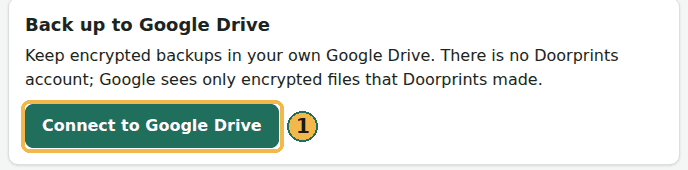
- Under Back up to Google Drive, choose Connect to Google Drive and sign in with Google.
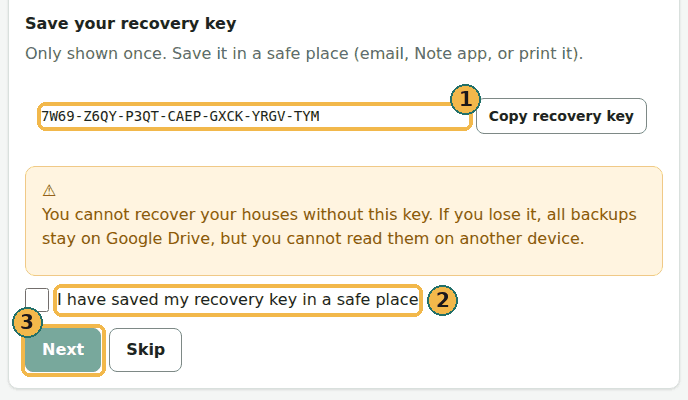
- Doorprints shows a recovery key once. Copy it and keep it somewhere safe. Tick I have saved my recovery key in a safe place, then continue. You can skip after a warning; without the key a new browser cannot join later.
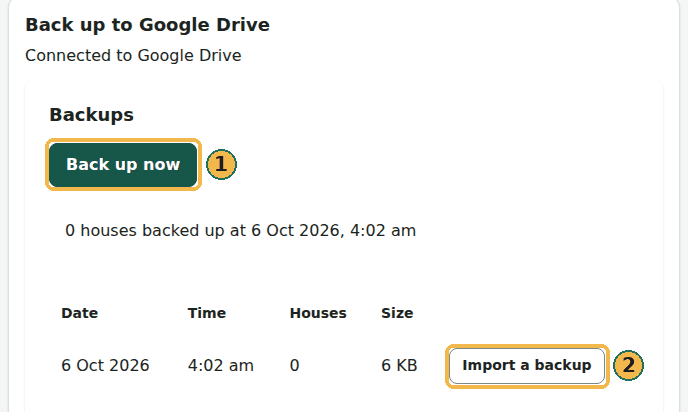
- Back up now writes an encrypted Full backup to Drive. Import a backup on a row hands the file to the Import a backup card on the same page; nothing is written until you confirm there.
- Automatic backup makes a backup about once a day while Doorprints is open in this browser.
Another browser
On a second computer, Connect then type the recovery key. You can also compare an 8-digit code (copy a pairing request from the new browser, paste it on one that is already connected, paste the reply back; both screens must show the same eight digits). A new browser can also show a QR code; the connected browser scans it or you paste the code.
Delete
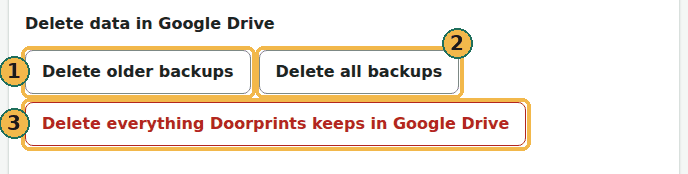
- Delete older backups (L1) does not need a passkey.
- Delete all backups and Delete everything Doorprints keeps in Google Drive (L2/L3) need a passkey on this browser: the computer's own Windows Hello or Touch ID, your phone (the browser shows a QR code to scan), or a security key. If the computer has no lock or Windows Hello yet, turn one on (Windows: Settings, Accounts, Sign-in options, PIN; Mac: a login password; Android: a screen lock; iPhone: a passcode), or choose your phone when the browser asks.
- Last resort: the recovery key. If a passkey was tried and this browser gave no secret value (PRF), Doorprints asks for your recovery key for that one deletion. It checks the key against your Drive and does not keep it. It is not offered just because Windows Hello is not set up, and never when a passkey works.
- There is a confirmation tick box. The website does not wait a countdown.
Photos you delete
Deleting a photo, or a house with photos, drops it from your device at once. Its encrypted copy stays in your own Google Drive for at least 30 days, so that Recently deleted > Restore can bring the photos back (Your data on the website, Settings on the phones). Restore reads the copy from your Drive, checks and decrypts it on your device, and uploads and deletes nothing; it needs Google Drive connected on that device and a connection, and it tells you how many photos came back and why the others did not. Delete everything Doorprints keeps in Google Drive removes these copies too, and then nothing can be brought back.
Privacy
The website's privacy page says what Google Drive is used for. Your houses stay encrypted. Disconnect this browser from Your data if you used a shared computer.